SMR for F-ZERO GX
概要
F-ZERO GX のスピードメータ指示値をテキスト化するプラグイン
詳細説明
SMR for F-ZERO GX
An output plugin which read speedometer numbers of F-ZERO GX and output them into text-based format.
Installation
Copy fzgx_smr_ks.auo file into the root or plugins directory of AviUtl. If you are not familiar with AviUtl, read USAGE.md for the instruction.
Building
You do not need to build for using this plugin. If you want to build yourself, enter the src directory and execute make. The Makefile is written for using g++ on MSYS2. You may need to modify the Makefile if your environment is other than MSYS2.
Notice
The input video should be 720x480 and F-ZERO GX should be set for 16:9 monitors. If the video is for 4:3 monitors or resized to other than 720x480 resolution, you must resize (into 540x480 for 4:3 monitors' video) the input video before using this plugin. The brief instruction is written in the Resizing section of USAGE.md.
Setting
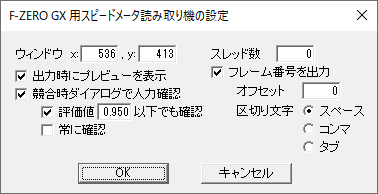
ウィンドウ / Position of the window
Specify the left-top coordinate of the window which covers the numbers of the speedometer. The default value will be appropriate. You can adjust the value in the preview dialog box if needed.
出力時にプレビューを表示 / Use the preview dialog box
Show the preview dialog box at the start of output. In the dialog box, you may adjust the window position so that the 4-digit number is displayed in the lower-right preview image in the same position as the upper-right sample image. You can change the coordinate one by one with the +/- buttons, or you can input the values directly. Changing the frame number changes the frame of the preview image, and does not affect the output file.
スレッド数 / The number of threads
Specify the number of threads used in this plugin. If the specifed number is less than or equal to 0, the specified number + the number of logical cores will be used instead.
競合時ダイアログで人力確認 / Use the confirmation dialog box when conflict happens
Show the confirmation dialog box when the models output conflicting values. If you checked "評価値X以下でも確認 / Use the dialog box when the evaluation value is less than or equal to X," the confirmation dialog box will also be shown when the max evaluation value (confidence) is less than or equal to the specified value. The evaluation value is between 0 and 1. If you checked "常に確認 / Always use the dialog box," the confirmation dialog box will be shown for every frame.
フレーム番号を出力 / Output frame numbers
Output the frame numbers together with the indicated number of the speedometer. "オフセット / Offset" specifies the first frame number of the output. "区切り文字 / Separator" specifies the separator letter from the three alternatives: "スペース / Spaces," "コンマ / Commas" and "タブ / Tabs."
Contributing
Bug reports and pull requests are welcome on GitHub at https://github.com/cycloawaodorin/fzgx_smr_ks.